



Backup & version management for compliance in OT environments
Octoplant is a vendor-neutral platform for automated backup and version management of OT systems such as PLCs. It creates transparency, supports compliance, and strengthens both operational reliability and cybersecurity.
Try for free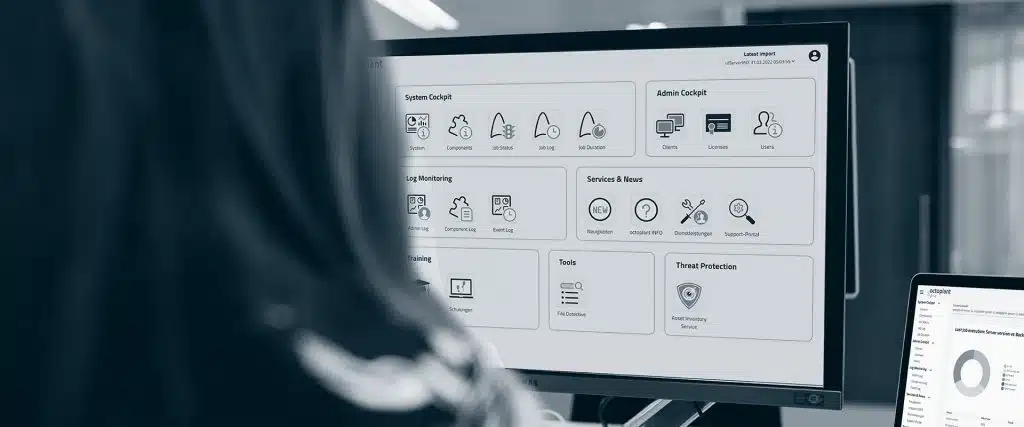





WHAT IS OCTOPLANT?
Software for backup and version management of OT systems
Octoplant automatically backs up, stores and compares all critical automation data in your production environment, from PLCs and HMIs to robots, drive systems and networked systems.
It provides:
- Centralised backup and version management
- Automated change detection with audit trail
- Rapid recovery in case of incidents
- Integrated OT cybersecurity with CVE detection
- Support for NIS2, ISO 27001, IEC 62443, GMP and 21 CFR Part 11
Built for businesses that demand traceability, reliability, and compliance at every step, Octoplant gives you full visibility into your automation systems and means you never have to worry about manual backups again.
KEY FEATURES
Automatic backups and complete version history

Automated, scheduled backups of all OT systems
Full version control with documented change history
Clear comparisons between project versions and parameters

Fast recovery of validated and approved versions
Identification of CVE/OT risks
This results in fewer errors, faster troubleshooting, and a solid foundation for auditing and regulatory compliance.
Download Demo Environment Now
Free 30-day trial!
Improve your preventive maintenance with octoplant. Reduce planned and unplanned downtime. Test octoplant free of charge for 30 days.
Challenges with manual version and backup management in your OT environment?

Unwanted changes that affect production
How Octoplant helps:
Octoplant provides centralised version control of all PLCs, HMIs, robots and drive systems. The platform automatically records all changes with full traceability, who changed what, when and why – and warns of unwanted changes.
Value:
Minimises the risk of using incorrect versions. Provides confidence that all systems are correctly versioned and validated.

Limited visibility between facilities and their systems
How Octoplant helps:
Octoplant creates a vendor-neutral and centralised overview of all factories and their various systems. It collects data from all manufacturers and systems, making it easy to follow up on their configurations and status.
Value:
Provides full transparency across the entire OT environment, simplifies maintenance and decision-making, and reduces the risk of missed issues.

Slow recovery after incidents and errors
How Octoplant helps:
Octoplant automates backups of all systems and configurations and documents each version. In the event of incidents, the platform can quickly restore the latest working version to PLCs, HMIs and other devices.
Value:
Rapid recovery minimises downtime, saves time and money, and allows production to quickly return to normal levels.

Increasing demands on auditing and compliance
How Octoplant helps:
Octoplant creates validated backups, full version history and a traceable audit trail for all changes. The platform supports regulatory requirements such as GMP, 21 CFR Part 11, NIS2, ISO 27001 and IEC 62443.
Value:
Simplifies audits, ensures compliance and minimises the risk of deviations during inspections or internal controls.
HOW DOES OCTOPLANT WORK?
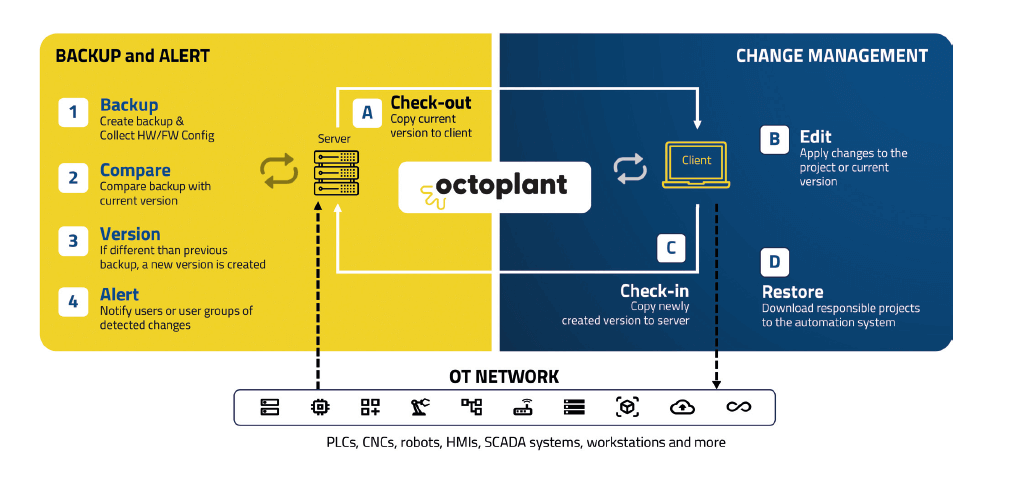
The left part of the workflow shows how Octoplant creates backups, compares versions, and alerts when unexpected changes occur.
The right-hand side shows controlled change management: you can check out current versions, make updates, and check in new versions. All changes are documented and traceable, supporting both internal standards and regulatory requirements. If necessary, previous versions can be restored directly to the system.
octoplant Hub
The octoplant hub uses dashboards to provide information about production, maintenance, and management. You can use it to access, analyse, and monitor data taken from numerous octoplant servers.
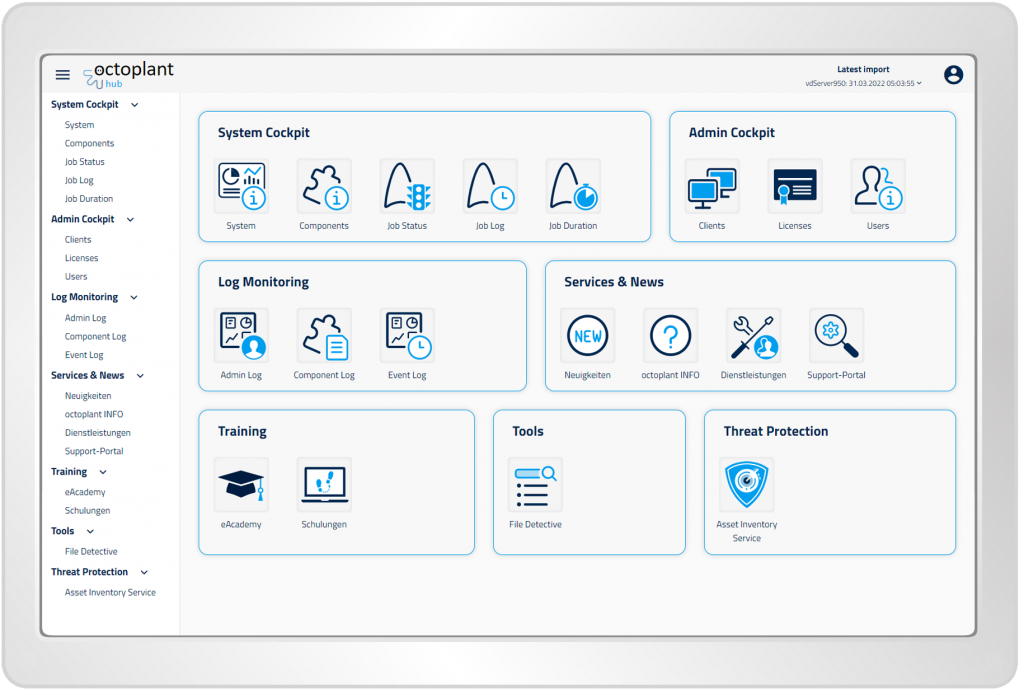
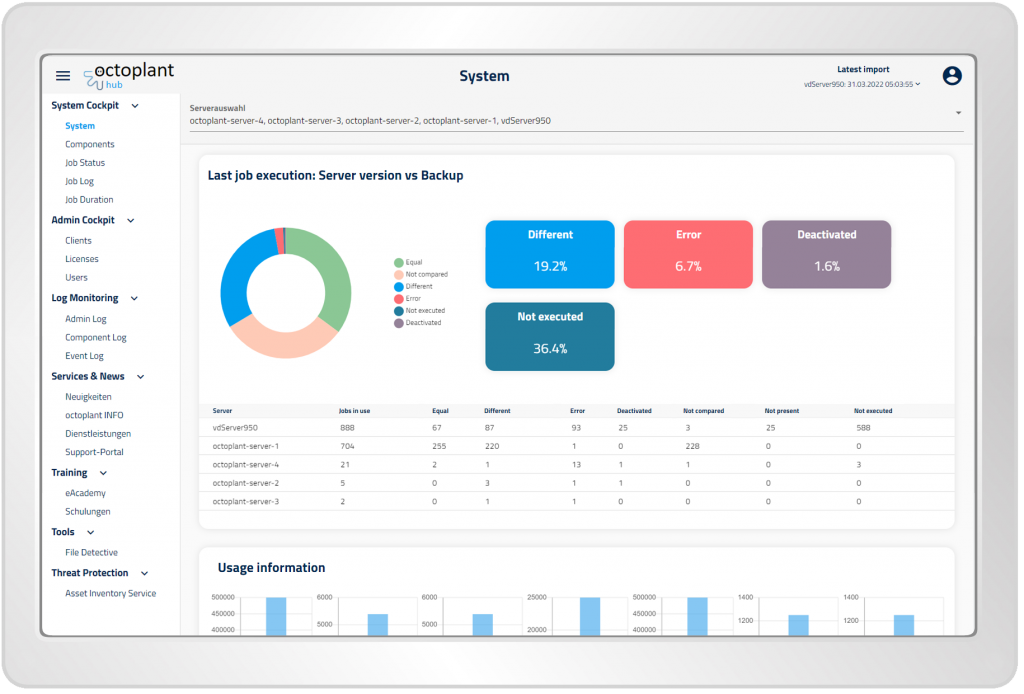
System Cockpit
The System Cockpit provides information and transparency about the degree of utilisation of octoplant. Questions such as “How many jobs are active, deactivated?” or “Which jobs led to an error?” can be easily answered here.
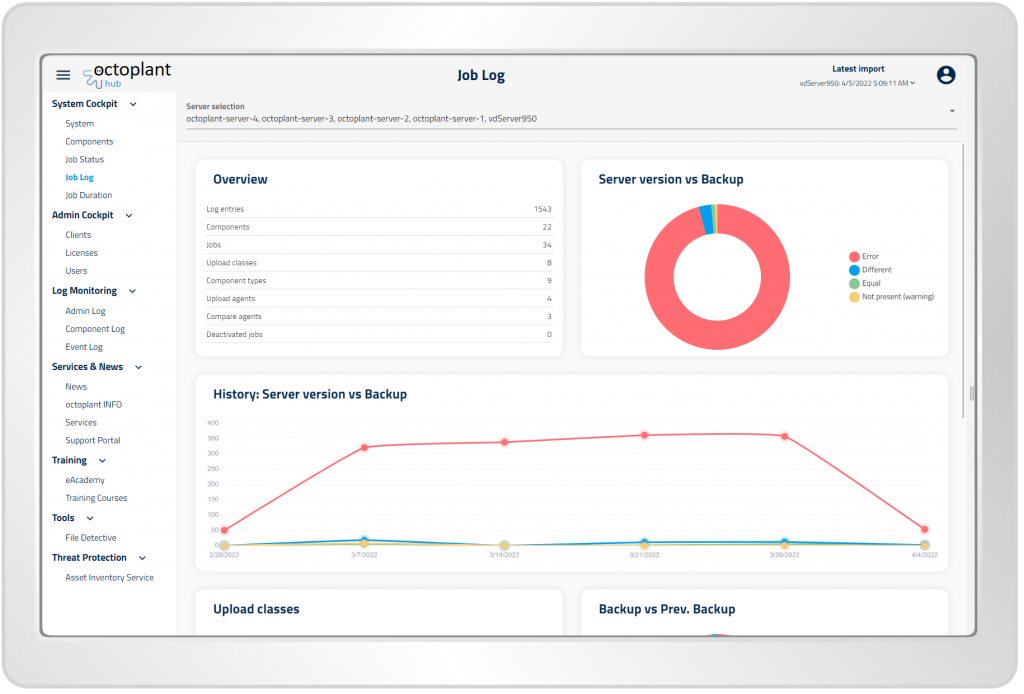
Job Log
Job Log lists the history of all jobs results. It provides a graphical analysis of job results (Equal, Different, Error, etc.) and allows the interactive filtering and sorting needed for analysing the history of specific jobs.
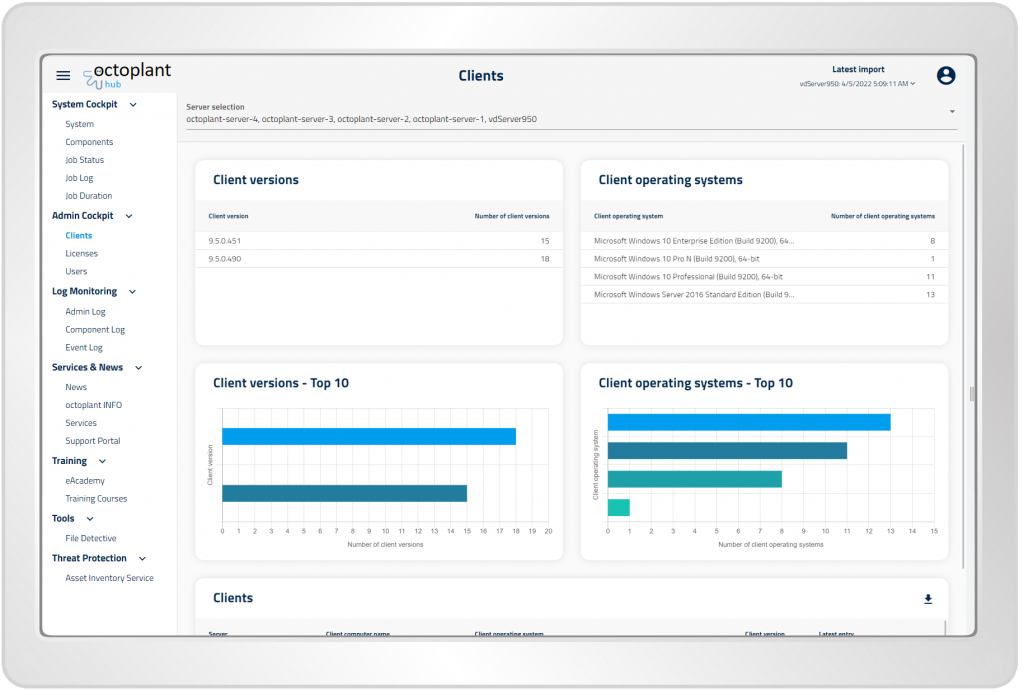
Admin Cockpit
Dashboards and reporting functionalities with overviews of users, client and licenses are available in the admin cockpit.
Overcoming complexity with octoplant
- Get an overview of your asset landscape, organise devices and drivers, and log the history of changes.
- Create (automation) backups and stay up to date on (unplanned) changes – with full visibility of any deviations.
- Reduce downtime and use the change history to restore configurations. Accurately find the correct version you need.
- Get an overview of your automation ecosystem data with an easy-to-use data analytics platform.
- Improve overall equipment effectiveness (OEE) through standardisation, synchronisation, increased visibility, and system integration.
- Implement regulatory workflows and compliance requirements and easily provide the necessary documents for audits.
- Identify potential risks or vulnerabilities and receive recommendations for maximum reliability and resilience.
-


Download file
Protect your OT environment with intelligent CVE management
OT security and CVE management
A new dimension of OT security – fully integrated and compliant
Octoplant includes a powerful feature to identify and assess common vulnerabilities (CVEs) in OT systems. By providing insights into the threat landscape, octoplant helps protect the facility and meet requirements from, for example, NIS2 and NIST.
Effective vulnerability management
The system matches hardware and software against public CVE databases and shows which devices are vulnerable. Each vulnerability is assigned a CVSS score, allowing you to prioritise actions based on threat level.
Detailed visibility and scalability
You get complete information about affected devices – such as model, firmware and network address – as well as links to official sources. CVE management can be scaled up across multiple sites, making it suitable for larger organisations.
Proactive and smart detection
Octoplant is automatically updated with new CVEs and is continuously improved with data from current projects, enabling accurate and up-to-date threat analysis without manual work.
Octoplant integrates with over 90 automation systems, including PLCs, HMIs, SCADAs and robots. It supports standardised industrial communication and works in mixed-manufacturer environments.
Octoplant delivers returns by reducing downtime, preventing costly configuration errors, and enabling faster recovery.
It creates a compliant OT environment that provides a stable foundation for auditing and regulatory compliance.
For industrial companies that need to be compliant and are dependent on automated production, want to minimise risks from data loss, misconfigurations or cyberattacks.
No, only the octoplant server requires a license. Clients can be installed without individual licenses.
Octoplant is offered as an annual subscription: Core, Plus and Premium. Premium includes all core features, octovision, asset inventory with CVE, server sync sender/receiver etc.
Through reliable backups, fast recovery and detection of changes and vulnerabilities (CVE).
Yes. Octoplant supports compliance with the directive’s requirements by strengthening IT/OT resilience and ensuring proper version management.
Read more about octoplant
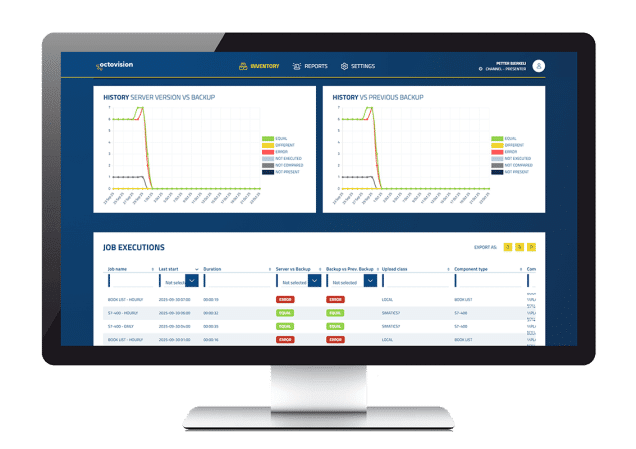
Octovision
The visual addition to octoplant
Octovision is a reporting tool in the “Octoplant ecosystem” designed to provide comprehensive overview, analysis and insights across your entire OT environment.
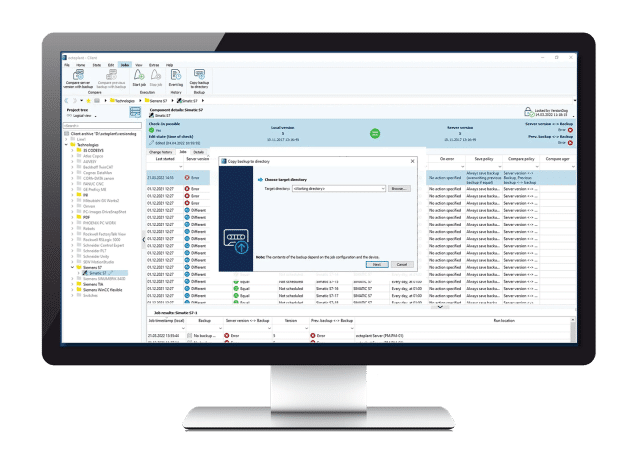
Octoplant within Medtech
Octoplant for the pharmaceutical industry
The regulations in the pharmaceutical industry are strict, read how you can use Octoplant in the pharmaceutical and life science industry.
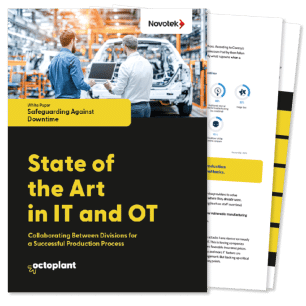
White paper
State of the Art in IT and OT
Learn how manufacturers reduce downtime and strengthen their resilience through effective IT/OT collaboration.
The whitepaper also includes a handy checklist to assess the status of your OT environment.